


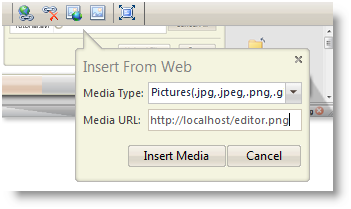
WebTextEditor introduces new ways to work with images and provides more flexibility for user to insert images. User can insert images from callout interface or media gallery task pane.
Task pane is an independent visual element on sidebar panel that displays related contents and editing actions which significantly improves overall user experience. It enables users to perform editing tasks more easily and conveniently in a single interface.
Image insertion through callout can be done by clicking on "Insert from Web" command in the toolbar.
 |
For further information about how to insert image through media gallery taskpane, please refer to task pane documentation. |
In This Section
How-to: Insert image to WebTextEditor